


- last updated : 16 jan 2010
Hello John D., welcome.
You are here because you have found a function by reading the tutorial Searching for functions in libraries and because you know how to make a function file.
If not, you are invited do it now, please.
Let's start.
Contents :
Configuring IDA
Making a signature of bytes
Displacement
Configuring IDA
So, you found CBasePlayerWeapon::KickBack(). Why not.
Before, to make more easily a signature, we need to configure IDA by showing the opcode bytes. You will understand.
Start to open IDA on this function.
Click on the IDA View tab, if not done already. If you are in graph view, click right and select Text View.
Go to the menu : Options > General.

In the windows, at the right, you see "Number of opcode bytes". Put a number like 10.
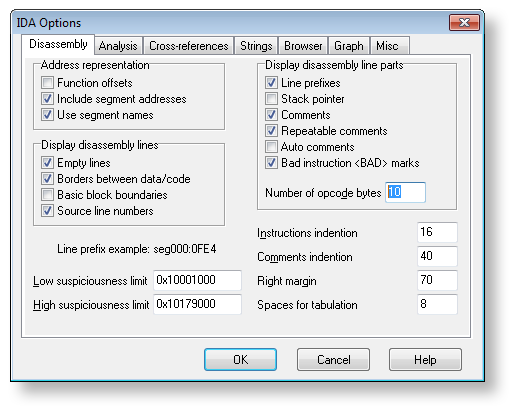
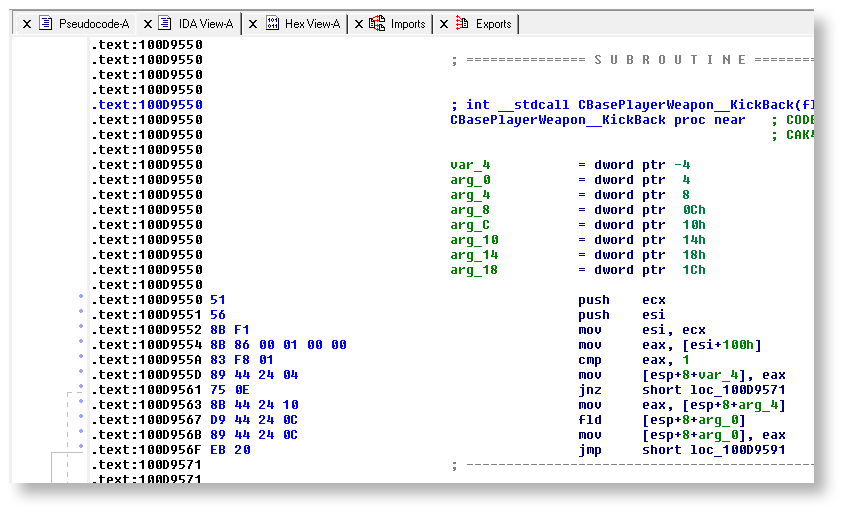
After validiting, you see finally something like the following image. Notice now the opcode bytes at the left.
Making a signature of bytes
We are ready to start to make a signature of bytes.
You have to keep in mind :
The signature needs to be unique.
The signature must start from the top of the function.
The length of the signature will depend of the content of the function.
If the content is somehow unique like KickBack(), you won't need a large signature.
If the content has a lot of memory references, there is a chance you would need a large signature.
A reminder : a signature would be an array of bytes or "*" or "?".
"*" is meant to be used when you don't care about the value of that byte.
"?" is meant to be used when you don't care about the value of the byte and it can even not exist.
About when you should place "*", a good rule would be : any memory references.
I can't explain because I don't know enough about assembly/memory but that's something it will change at restart.
It's explained further down.
Note : in IDA, '?' has the same meaning as '*' in Orpheu.
So, here my way, the main steps :
We retrieve an amount of bytes.
We replace any memory references with '?'.
We check with IDA if this block of bytes is well referenced one time. If not, back to 1) and increasing the amount of bytes.
We modify the block of bytes to be compliant to the Orpheu format.
We make the function file and we test.
1) We retrieve an amount of bytes
- Make sure the cursor is at the top of the function.
- Go the Hex View tab.
- Select an amount of bytes, like at least the first 16 bytes.
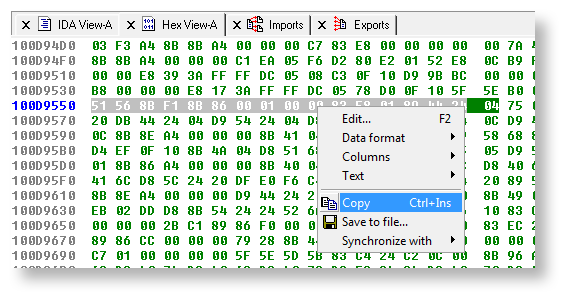
- Copy them in a text editor.

2) We replace any memory references with '?'
EDIT: A more simple way would be :
Keep always the first byte
Replace any others bytes with "?"
That's all.
Old way
Before wanted to replace we need to understand what we have to replace.
You don't need really to know about assembly to do that, though there are few things to know.
I don't know much about it, so if you want to learn more, search for tutorials.
Here, how is composed an instruction. All are optional except the opcode. (image stolen from a tutorial)
All "SIB", "Displacement" and "Immediate" would need to be replaced with "*".
Basically, when you see any value, call to a function and jump to a location or value referenced with a var.

Let's try with the KickBack() bytes.
Code: Select all
51                     push    ecx                  // no memory reference.
 └────── Opcode ────────┴───────┘                   // 51
      (fixed form)

56                     push    esi                  // no memory reference.
 └────── Opcode ────────┴───────┘                   // 51 56
      (fixed form)

8B F1                  mov     esi, ecx             // no memory reference.
 └──┼───── Opcode ──────┘       │    │              // 51 56 8B F1
    └───── ModR/M ──────────────┴────┘

8B 86 00 01 00 00      mov     eax, [esi+100h]      // 100h is an offset. It may change.
 └──┼──┼── Opcode ──────┘       │     │   │         // 51 56 8B F1 8B 86 ? ? ? ?
    └──┼── ModR/M ──────────────┴─────┘   │
       └── Displacement ──────────────────┘
83 F8 01               cmp     eax, 1               // no memory reference, but an hardcoded value. It may change by a plugin or something.
 └──┼──┼── Opcode ──────┘       │   │               // 51 56 8B F1 8B 86 ? ? ? ? 83 F8 ?
    └──┼── ModR/M ──────────────┘   │
       └── Immediate ───────────────┘

89 44 24 04            mov     [esp+8+var_4], eax   // When you click right on it, you see 8+var_4 is equal to 4, a relative offset.
 └──┼──┼──┼─ Opcode ────┘        │  │   │      │    // Anyway, it may change. I've notived also the SIB is generally different on cz.
    └──┼──┼─ ModR/M ─────────────┼──┼───┼──────┘    // 51 56 8B F1 8B 86 ? ? ? ? 83 F8 ? 89 44 ? ?
       └──┼─ SIB ────────────────┘  │   │
          └─ Displacement ──────────┴───┘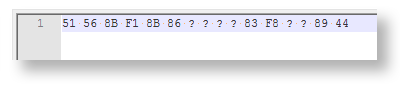
It might not be enough.
3) We check with IDA if this block of bytes is well referenced one time
Let's check if IDA find only one reference.
Go the menu, Search > sequence of bytes... or you can use the shortcut alt + B.
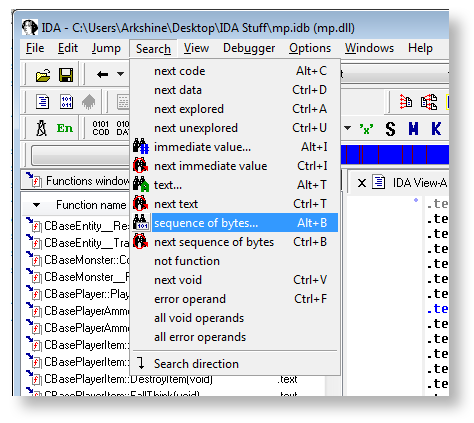
In the windows, paste the block of bytes.
Make sure to mark as Hex and you want to Find all occurences.

As result, we see one reference, and it's good. It means it's unique and we can use this block of bytes as signature.

4) We modify the block of bytes to be compliant to the Orpheu format
Don't bother to do byte by byte. With your text editor you can use replace.
It's probably possible to create a macro to do the task automatically, if your software supports the macros.
Anyway, manually :
Code: Select all
// So, you have that.
51 56 8B F1 8B 86 ? ? ? ? 83 F8 ? 89 44

// Replace all ' ?' by ,"*". Be careful if use '?' for orpheu.
51 56 8B F1 8B 86,"*","*","*","*" 83 F8,"*" 89 44

// Replace all ' ' by ',0x'
,0x51,0x56,0x8B,0xF1,0x8B,0x86,"*","*","*","*",0x83,0xF8,"*",0x89,0x44

// Fix the first byte, add '[' and '] and your signature is ready.
[0x51,0x56,0x8B,0xF1,0x8B,0x86,"*","*","*","*",0x83,0xF8,"*",0x89,0x44]We make our file :
Code: Select all
{
    "name"       : "KickBack",
    "class"      : "CBasePlayerWeapon",
    "library"    : "mod",
    "arguments"  :
    [
        {
            "type" : "float"
        },
        {
            "type" : "float"
        },
        {
            "type" : "float"
        },
        {
            "type" : "float"
        },
        {
            "type" : "float"
        },
        {
            "type" : "float"
        },
        {
            "type" : "int"
        }
    ],
    "identifiers":
    [
        {
            "os"    : "windows",
            "mod"   : "cstrike",
            "value" : [0x51,0x56,0x8B,0xF1,0x8B,0x86,"*","*","*","*",0x83,0xF8,"*",0x89,0x44]
        },
        {
            "os"    : "linux",
            "mod"   : "cstrike",
            "value" : "KickBack__17CBasePlayerWeaponffffffi"
        }
    ]
}Code: Select all
Parsing folder "CBasePlayerWeapon" started
        Parsing file "KickBack" started
                Argument type "float" validated
                Argument type "float" validated
                Argument type "float" validated
                Argument type "float" validated
                Argument type "float" validated
                Argument type "float" validated
                Argument type "int" validated
                Searching for signature "[0x51][0x56][0x8b][0xf1][0x8b](...)" ... FOUND
        Parsing file "KickBack" ended
Parsing folder "CBasePlayerWeapon" ended
If you see "NOT FOUND", check carefully what you have done. It may either a typo or you have missed a byte to ignore.
Displacement top
Depending the content of the function, it may be impossible to make a decent signature of bytes, either because there are only few bytes or too much memory references.
In this case, you have the possibility to use the "displacement" field.
It allows you to define a block of bytes which doesn't start from the top of the function, then you need to adjust with this field.
It can be negative or positive value.
Example with our previous signature, I remove the 2 first bytes :
Code: Select all
{
    "os"    : "windows",
    "mod"   : "cstrike",
    "value" : [0x51,0x56,0x8B,0xF1,0x8B,0x86,"*","*","*","*",0x83,0xF8,"*",0x89,0x44]
},Code: Select all
{
    "os"    : "windows",
    "mod"   : "cstrike",
    "value" : [0x8B,0xF1,0x8B,0x86,"*","*","*","*",0x83,0xF8,"*",0x89,0x44],
    "displacement" : -2
},Feel free to ask if you don't understand something.
I will add later a plugin to get the bytes from an offset provided.
It may help if you have problems to make a signature.
That's all.